Guide
How to Set Contract Renewal Reminders Before Notice Windows Close
A practical reminder setup for small teams that need to track contract review dates, notice deadlines, owners, approvals, and renewal closeout without waiting until the expiration date.
By RenewOps Editorial Team
Written by the RenewOps team — operations and compliance professionals who have helped small teams track licenses, contracts, and certifications across healthcare, construction, and financial services.
Direct answer: set reminders from the earliest action date
Set contract renewal reminders backward from the earliest date that requires action, usually the notice deadline or internal review date. Do not rely on the expiration date alone.
A safe setup gives each contract an owner, risk tier, notice date, review date, renewal date, expiration date, and reminder ladder. Critical contracts should usually start at 90 days. Standard contracts often work with 60/30/14/7. Low-risk contracts can use 30/14/7.
The key is to separate reminders from decisions. A reminder should not simply say that the contract expires soon. It should tell the owner what decision is due next: review the vendor, prepare cancellation notice, request updated terms, collect approval, or close the renewal record.
Dates to capture before setting reminders
Review date
When the team should start evaluation, pricing review, and vendor performance checks.
Notice deadline
The last safe date to send cancellation, renewal, or renegotiation notice.
Renewal date
The date the next term or renewal decision becomes effective.
Expiration date
The final contract end date if no renewal or extension is completed.
Approval deadline
Internal date for finance, legal, operations, or owner sign-off.
Recommended contract reminder schedule
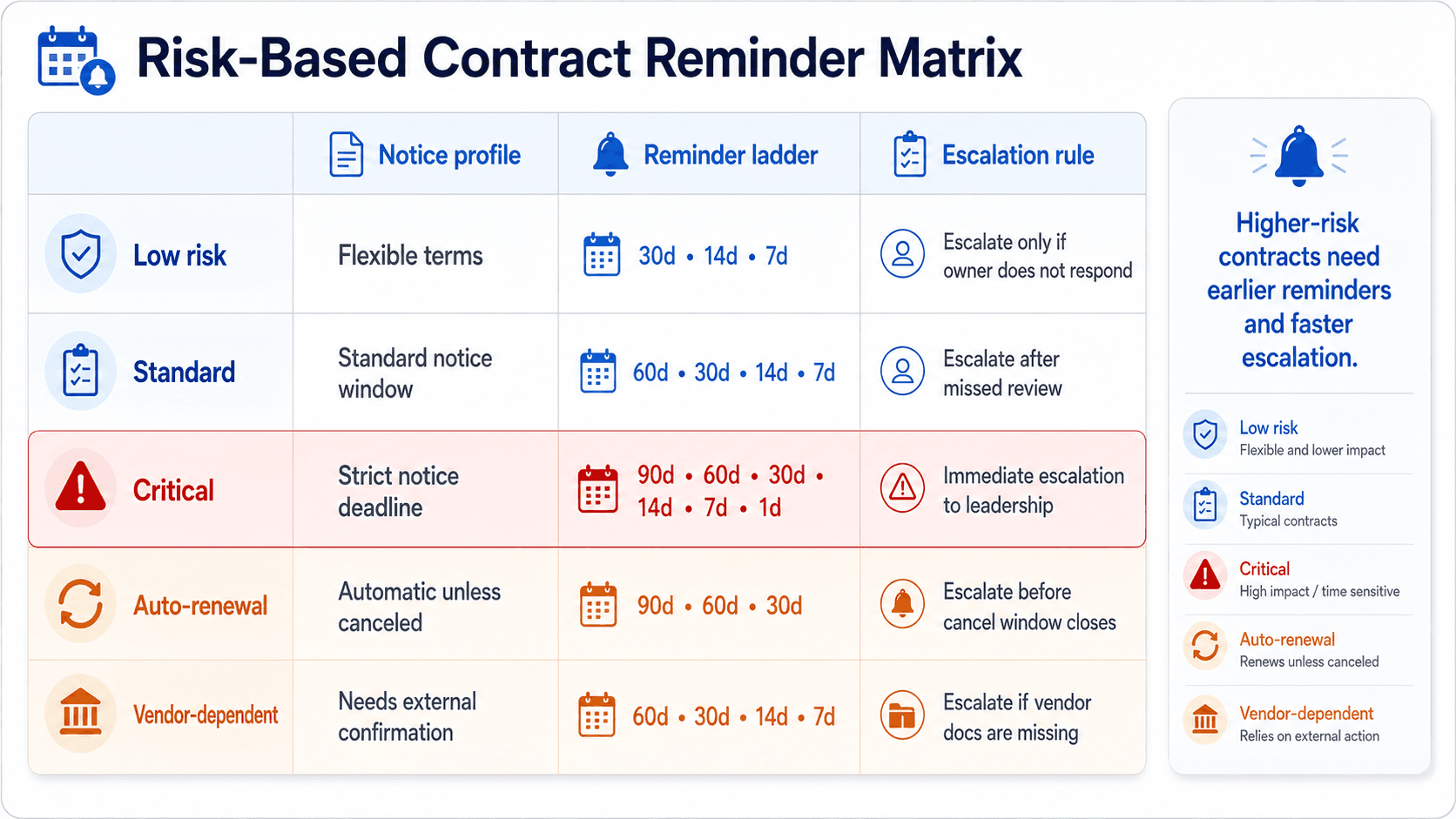
| Contract type | Notice profile | Reminder ladder | Escalation rule |
|---|---|---|---|
| Low risk | No strict notice period | 30 / 14 / 7 | Owner confirms renewal or closeout in weekly review. |
| Standard | 30-60 day notice window | 60 / 30 / 14 / 7 | Escalate if no decision by 30 days before notice. |
| Critical | 60-90 day notice window | 90 / 60 / 30 / 14 / 7 / 1 | Escalate blocked records to approver before notice window. |
| Auto-renewal | Cancellation notice required | 90 / 60 / 30 / 14 / 7 / 1 | Confirm cancellation, renegotiation, or renewal before notice date. |
| Vendor-dependent | External paperwork needed | 60 / 30 / 14 / 7 / 1 | Request vendor evidence early and track status separately. |
If a contract has both a notice deadline and an expiration date, use the notice deadline as the earlier planning anchor. The expiration date still matters, but it is often too late for safe action.
For contracts with vague language, treat the reminder schedule as a risk-control system: add the earliest possible notice window, assign a named owner, and set the first reminder before any renegotiation or budget approval would normally need to begin.
Timeline graphic
Example 90/60/30/14/7/1 contract reminder ladder
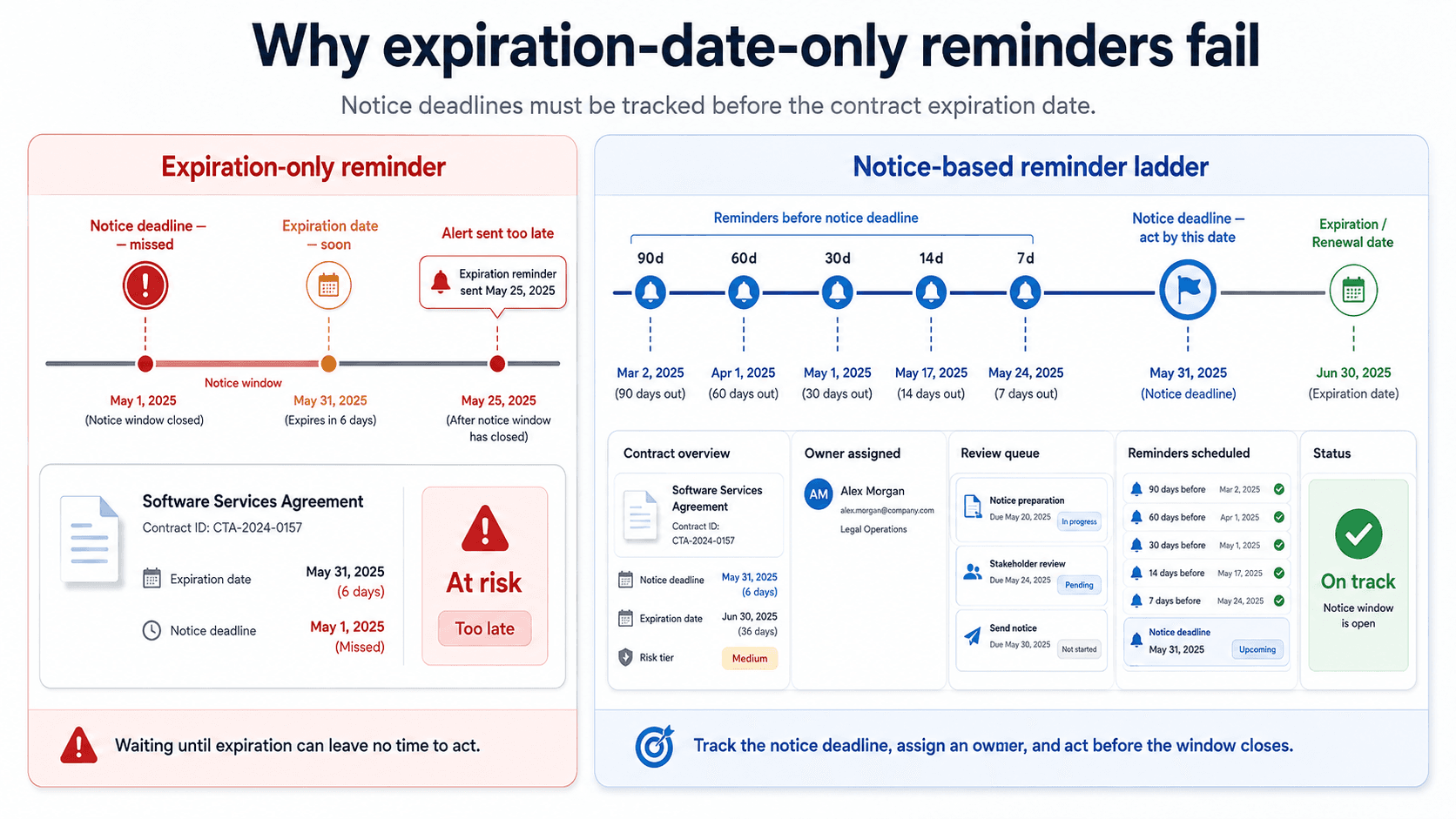
90d
Start review
Confirm owner, value, vendor performance, renewal intent, and required notice.
60d
Prepare decision
Collect pricing, risk notes, usage context, and approval requirements.
30d
Commit path
Renew, cancel, renegotiate, or escalate if the decision is blocked.
14d
Execute notice
Send required notice or confirm renewal evidence is moving.
7d
Verify status
Confirm vendor receipt, internal approval, or renewal closeout.
1d
Close loop
Mark renewed, expired, canceled, or still blocked so the queue stays accurate.
Review date
Start decision work before the notice deadline gets close.
Notice deadline
Send renewal, cancellation, or renegotiation notice on time.
Expiration date
Close the record and reset next-cycle tracking.
Ownership and escalation rules for contract reminders
Contract reminders work best when every reminder has a person, a decision, and a backup path. If the reminder only says renewal due but nobody owns the next step, the team still depends on memory.
A small team does not need a complex approval system. It needs enough structure to prevent silent auto-renewals, rushed renewals, and missed cancellation windows. Start by assigning one owner and one escalation person for any contract that affects revenue, operations, compliance, or customer delivery.
Record owner
Owns the next action, updates status, and confirms whether the contract is renewing, canceling, or blocked.
Approver
Reviews pricing, scope, legal terms, budget impact, or operational risk before the notice deadline.
Backup owner
Steps in when the primary owner is unavailable during the final reminder window.
Weekly reviewer
Checks the contract queue for missing dates, overdue reminders, and unresolved decisions.
Common mistakes that make contract reminders fail
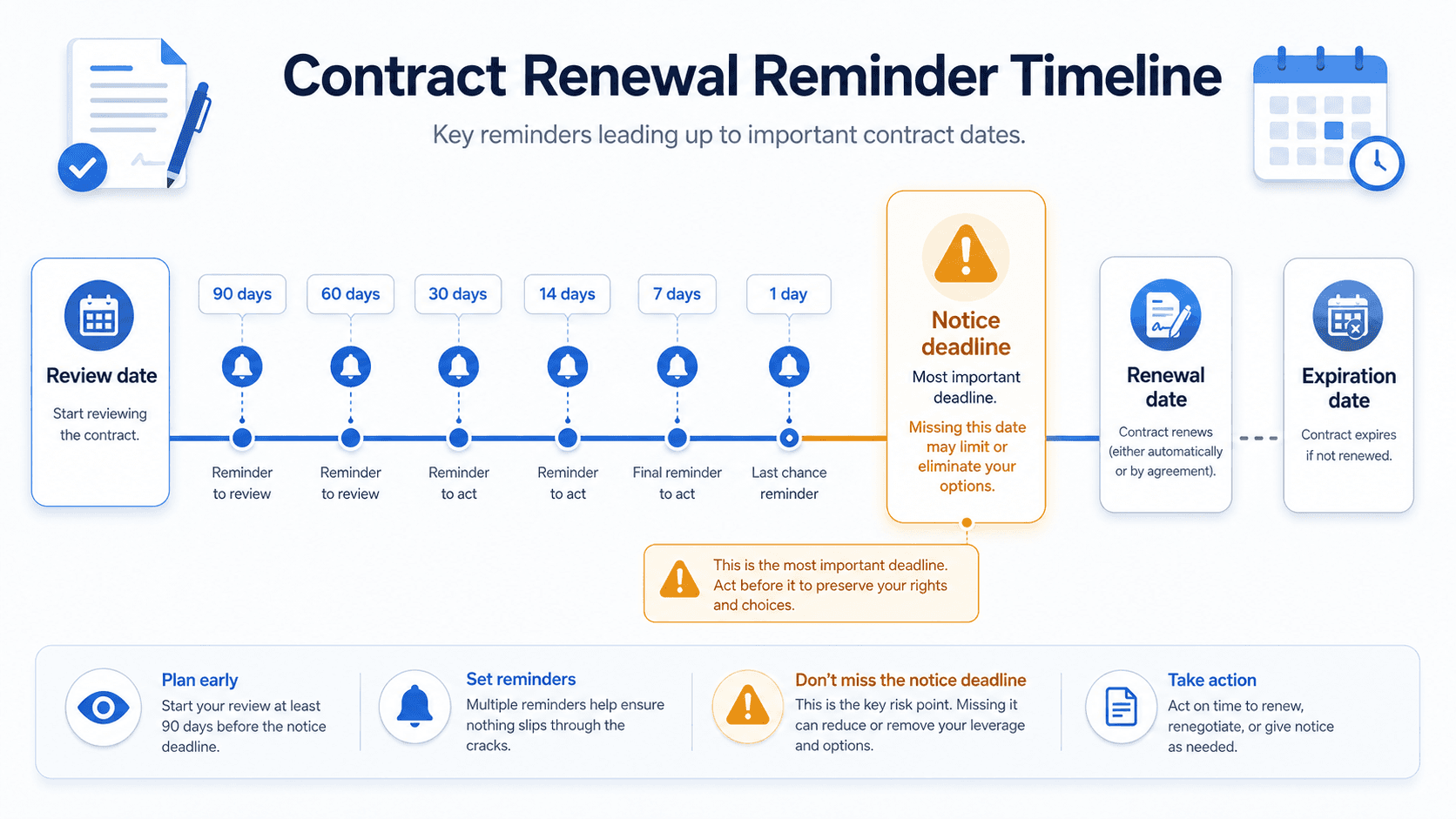
Reminder only on expiration date
By then the notice period may already be missed.
No owner
A reminder without ownership is just a notification, not an action.
No notice date
Auto-renewal and cancellation windows depend on notice timing, not just expiration.
Same cadence for every contract
Critical contracts need more lead time than low-risk agreements.
No weekly review
Email reminders need a status queue so completed and blocked work stays visible.
When a dedicated system helps
Calendar reminders can work for one or two low-risk contracts. A dedicated contract reminder workflow helps when multiple owners, notice periods, approvals, and renewal decisions overlap.
RenewOps keeps the reminder connected to the record, owner, status, and risk tier. That matters because a renewal is not done when an email is sent; it is done when the team records the decision and resets the next cycle.
A useful contract reminder system should also preserve the reason behind the action. For example, a contract may need a 90-day reminder because it requires legal review, vendor evidence, board approval, or enough time to compare alternative suppliers. Keeping that context with the record makes the next renewal cycle easier than the last one.
FAQ
For critical contracts, start 90 days before the notice deadline or review date. Standard contracts can often use 60/30/14/7, while low-risk contracts may use 30/14/7.
Use the earliest action date. If the contract has a notice deadline, reminders should work backward from that date, not only the final expiration date.
It is an early reminder used for high-risk contracts so the team has time to review performance, collect approvals, renegotiate terms, or send cancellation notice before the window closes.
Assign the person responsible for the renewal decision or next action. For important contracts, also name an approver or escalation owner.
A spreadsheet can work at low volume, but it becomes fragile when contracts need notice dates, owners, reminder ladders, status review, and escalation.