Solution
Renewal Tracking Software for Contracts, Licenses, Documents, and Subscriptions
RenewOps helps small teams move renewal work out of spreadsheets and inbox memory. Track recurring deadlines, owners, statuses, risk tiers, reminders, and imports in one renewal control system.
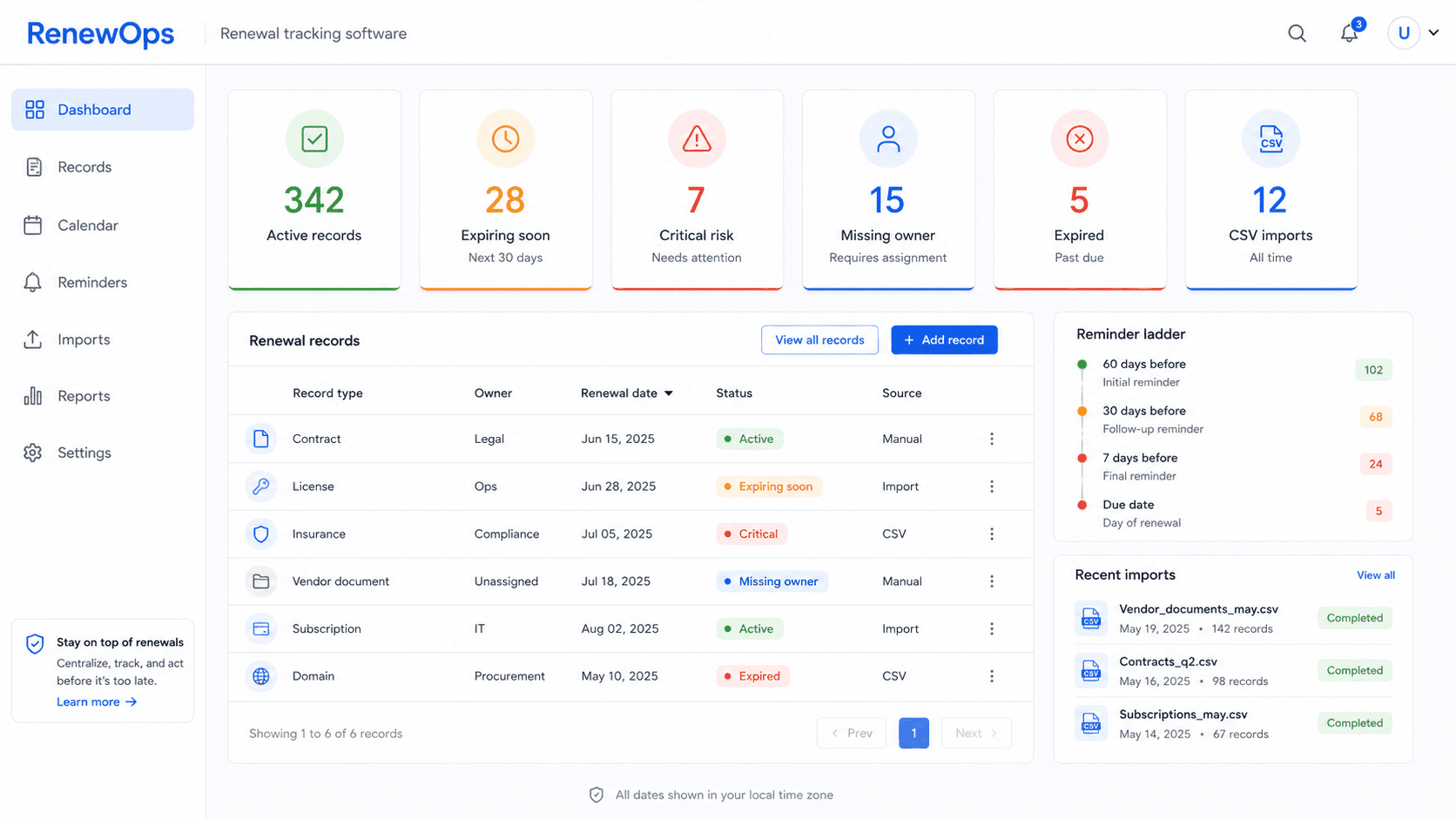
Renewal control dashboard
Know what needs attention this week
Active records
126
Records currently being tracked
Expiring soon
18
Deadlines inside the review window
Critical risk
7
High-impact records that need earlier action
Missing owner
4
Records that cannot be trusted yet
Expired
3
Items requiring closeout or escalation
CSV imports
2
Spreadsheet batches converted this month
What renewal tracking software does
Renewal tracking software is a shared system for records with recurring dates: contracts, licenses, insurance policies, certificates, vendor documents, SaaS subscriptions, domains, and other deadline-driven work.
The goal is not just to send an alert. A useful renewal system shows what exists, who owns it, what date matters next, how risky the record is, and whether the renewal is active, expiring soon, expired, or done.
That makes it different from a simple reminder app. Renewal work usually includes a chain of decisions: review the record, confirm the owner, collect evidence, approve budget, notify a vendor, mark the renewal complete, and reset the next cycle. A tracking system keeps those decisions attached to the record.
What belongs in a renewal record
A renewal record should be detailed enough that someone can act on it without searching email threads or asking who owns the deadline. The record does not need enterprise contract-management depth, but it does need enough context for weekly review.
Title and type
What the renewal is and whether it is a contract, license, policy, credential, document, domain, or subscription.
Owner
The person responsible for the next action and for keeping the record current.
Critical dates
Expiration date, renewal date, notice date, review date, and any internal approval deadline.
Risk tier
Critical, standard, or low, so reminder timing matches operational impact.
Reminder ladder
The scheduled offsets that trigger action before the date becomes urgent.
Status and notes
Whether the record is active, expiring soon, expired, renewed, blocked, or waiting for evidence.
Renewal tracking coverage by record type
| Record type | Critical dates | Operational context |
|---|---|---|
| Contracts | Notice date, renewal date, expiration date | Vendor owner, approver, renewal decision |
| Licenses | Renewal date, expiration date, review date | Responsible person, regulator, supporting documents |
| Insurance | Policy expiration, broker follow-up, renewal quote date | Coverage owner, risk tier, renewal evidence |
| Certifications | Credential expiration, recertification window | Employee owner, manager, CE notes |
| Vendor documents | COI/certificate expiration, evidence request date | Vendor owner, document collector, status |
| Subscriptions and domains | Billing renewal, domain expiration, cancellation window | Tool owner, finance owner, continuity risk |
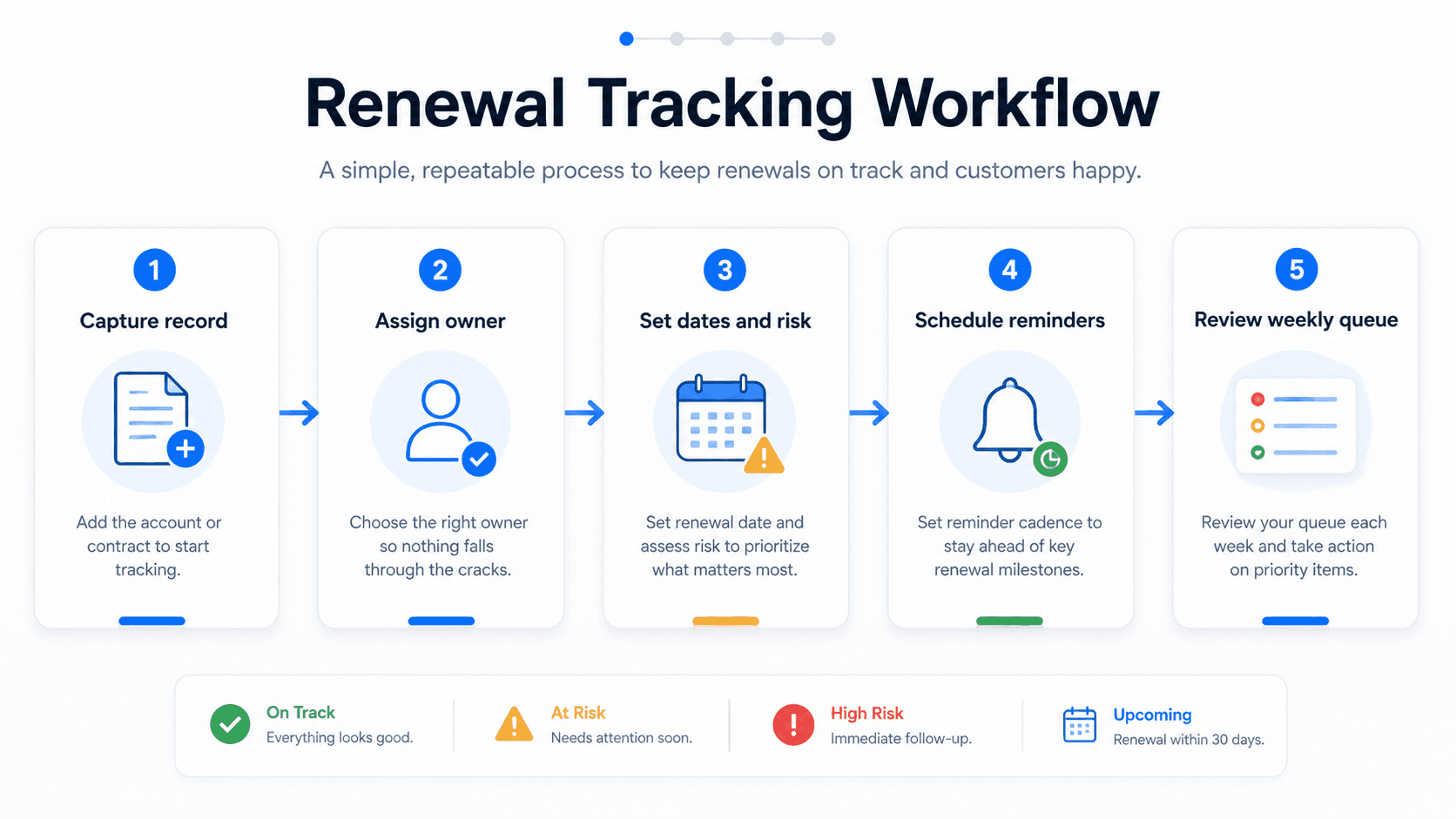
Workflow
From spreadsheet list to weekly renewal queue
Capture each renewal record
Store the title, type, owner, key dates, risk tier, notes, and supporting context.
Assign ownership
Every renewal needs a human owner before reminders become useful.
Set status and risk
Separate active, expiring soon, expired, and renewed work so the review queue stays focused.
Schedule reminders
Use 90/60/30/14/7/1 or lighter ladders depending on risk and lead time.
Review the queue weekly
Close completed renewals, escalate blocked records, and update the next cycle.
Review dashboard
The checks a renewal queue should answer every week
Who is accountable before a deadline becomes urgent?
Which items already have a reminder ladder scheduled?
Which high-risk renewals were checked this week?
Which past-due records still need cleanup or closeout?
This is not meant to be generic analytics. It is a practical review screen for renewal operations: find missing owners, missing reminders, critical records that need a decision, and expired items that should not stay unresolved.
For a small team, the value is simple: open the queue once a week, fix the blind spots, and leave with a shorter list of deadlines that can surprise the business.
Spreadsheet vs renewal tracking software
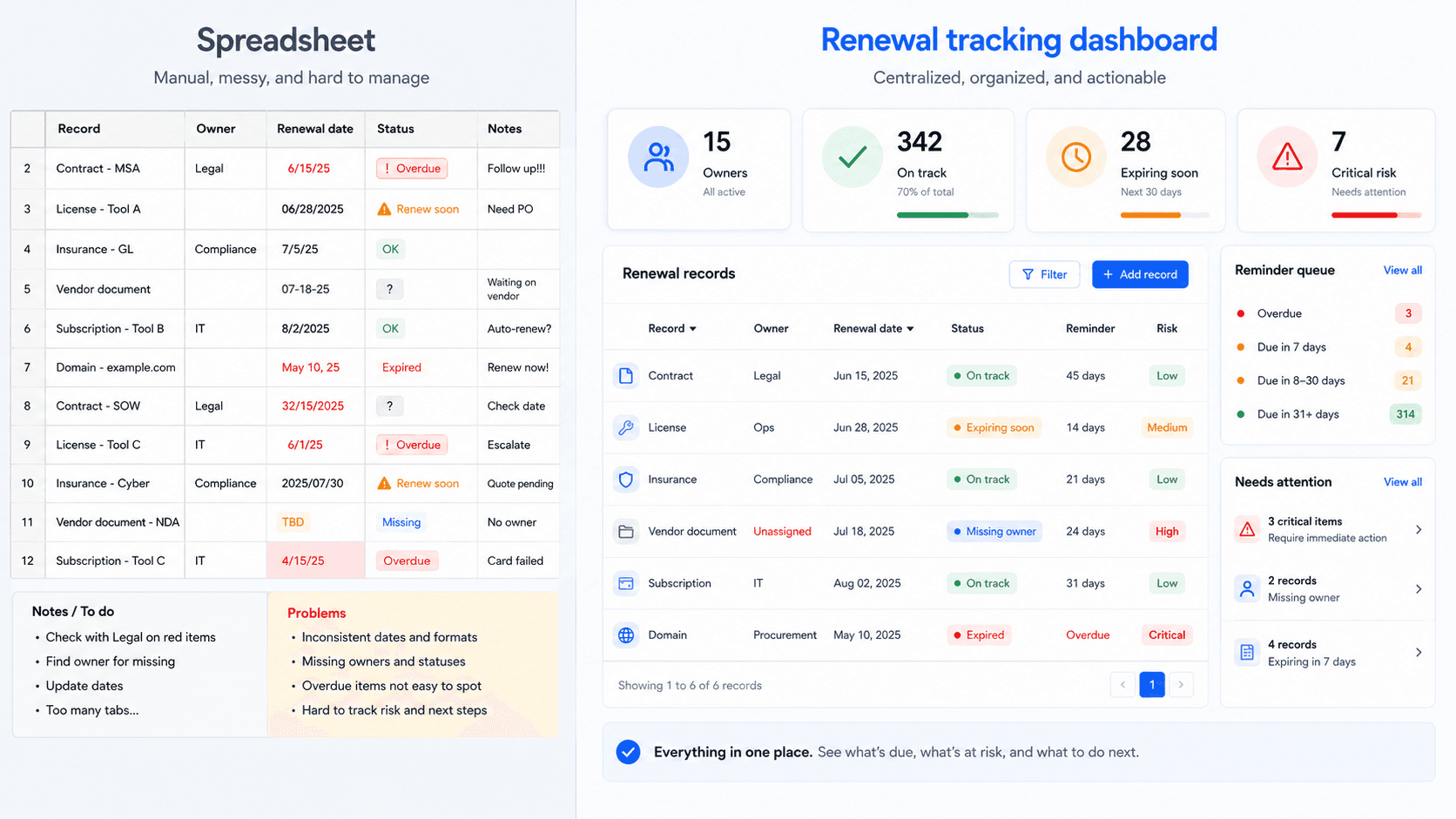
| Capability | Spreadsheet | RenewOps |
|---|---|---|
| Owner accountability | Usually a column someone forgets to update | Built into every record and review queue |
| Reminder timing | Manual formulas, calendar copies, or inbox memory | Risk-based reminder ladders per record |
| Status visibility | Hard to scan across many tabs | Active, expiring soon, expired, and renewed queues |
| Mixed record types | Contracts, licenses, docs, and subscriptions drift apart | One model for many renewal categories |
| Weekly review | Requires manual filtering and sorting | Dashboard-first review flow |
| Import/export | Easy to start, harder to govern | CSV import/export with structured validation |
If your list is still small, a spreadsheet can be enough. When renewal work needs shared ownership, reliable reminders, CSV import, and status visibility, a structured renewal tracker becomes safer.
Warning signs that the spreadsheet is becoming risky
- Different teams keep separate renewal lists.
- A deadline was found only after a vendor, regulator, or finance owner asked about it.
- Calendar reminders fire, but nobody knows whether the renewal was completed.
- The spreadsheet has dates but no reliable owner, status, or escalation path.
- CSV imports, exports, and recurring reviews are becoming part of the weekly workflow.
Import existing renewal lists
Use CSV import to move spreadsheet records into a structured renewal model.
Plan before the deadline
Track review, notice, renewal, and expiration dates instead of relying on one final date.
Control high-risk renewals
Use risk tiers and owner accountability for records that can create operational disruption.
Authoritative context
Why renewal visibility matters beyond software
Renewal tracking touches operational, financial, and risk workflows. Public guidance from the U.S. Small Business Administration notes that license and permit requirements vary by business activity, location, and government rules. The Federal Trade Commission also explains how automatic renewals can create recurring charges when teams do not actively manage cancellation and renewal terms.
For vendor-heavy workflows, the NIST Cybersecurity Supply Chain Risk Management guidance is a useful reminder that supplier and vendor evidence needs ongoing review, not one-time collection.
RenewOps stays intentionally narrower than an enterprise compliance suite. The product is designed for small teams that need practical deadline control: a list of records, accountable owners, recurring reminders, status visibility, and a review rhythm that prevents important renewals from hiding in a spreadsheet.
Run renewal tracking with fewer blind spots
FAQ
Renewal tracking software stores renewal records, key dates, owners, statuses, and reminder schedules so small teams can act before contracts, licenses, documents, subscriptions, or domains expire.
Expiration reminder software focuses on alert timing. Renewal tracking software is broader: it includes records, owners, statuses, risk tiers, imports, exports, and review queues.
Start with high-risk contracts, business licenses, insurance policies, vendor documents, domains, subscriptions, and staff certifications where a missed deadline creates cost or operational disruption.
It can replace spreadsheet tracking once the team needs owner accountability, reminder ladders, status queues, import validation, and cross-record review.
Yes. RenewOps supports CSV import and export so teams can move existing renewal lists into a structured workflow without retyping everything.