What staff credential tracking software does
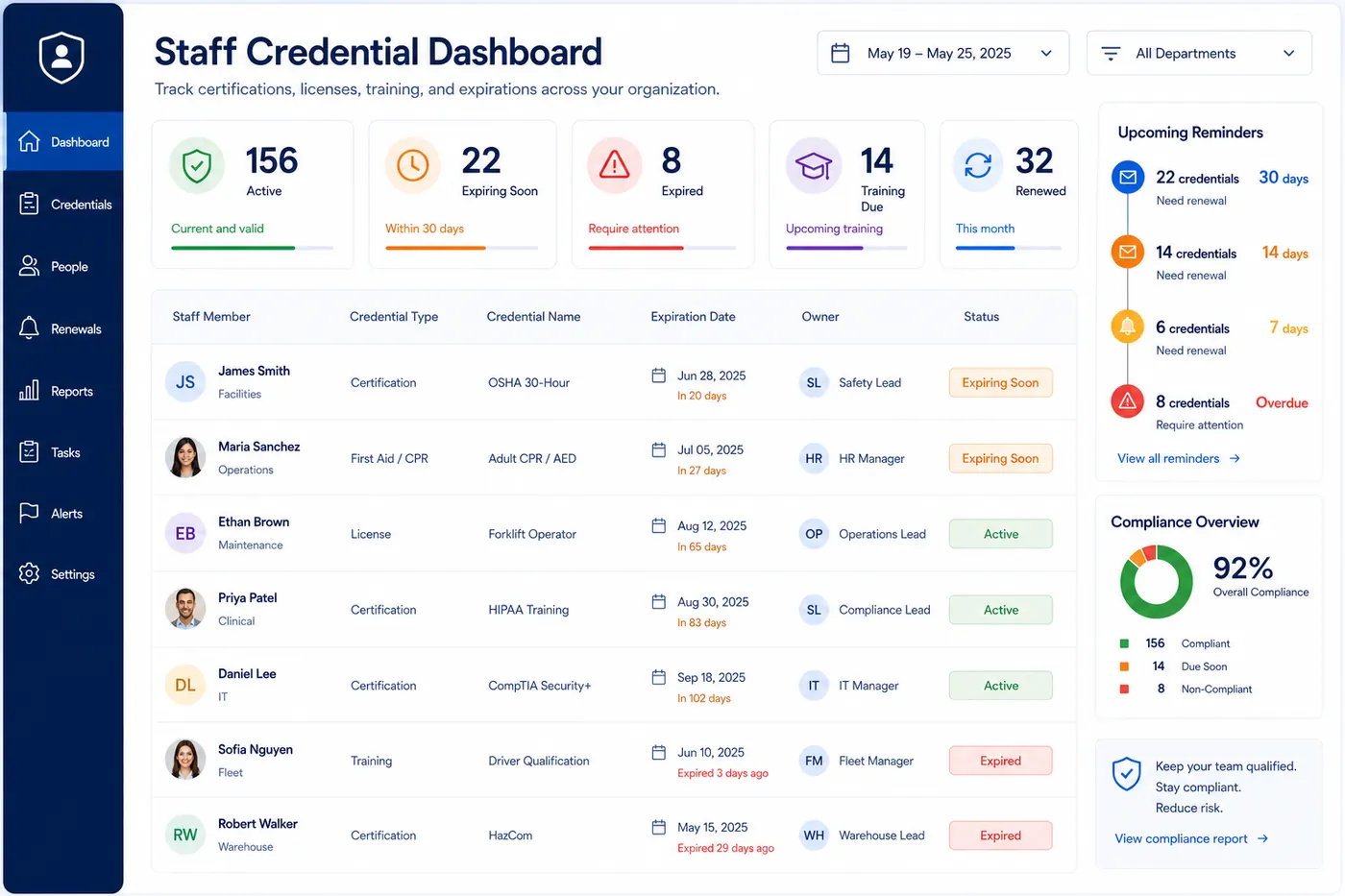
Staff credential tracking software turns employee credentials into operational records. Each record includes the credential name, employee or owner, expiration date, renewal status, reminder timing, and notes needed for follow-up.
This is different from a static employee spreadsheet. The working view is a queue: what is active, what is expiring soon, what is expired, and what still needs evidence before the next cycle closes.
The software is most useful when the question is not just expiration timing, but who can work, what is at risk, and what needs follow-up this week. That is why ownership, status, reminder timing, and risk tier belong in the same record.
For the process side, use the credentialing management guide. For certification-only workflows, use certification expiration tracking.
Who staff credential tracking is for
Staff credential tracking is for small teams that need operational control without deploying a large HR, credentialing, or compliance platform. The common pattern is a shared roster of people, each with credentials that expire, require renewal evidence, or need periodic review.
Operations-heavy SMBs
Teams where staff credentials affect whether work can be scheduled or delivered.
Contractor and field teams
Groups that need licenses, safety training, insurance-linked credentials, or site access documents.
Agencies and service firms
Teams with customer-mandated credentials, recurring training, and manager-owned follow-up.
Healthcare-adjacent teams
Small clinics, staffing groups, and care operations that need lightweight license and credential visibility.
Credentials small teams usually need to track
Professional licenses
criticalClinical, field, technical, or regulated staff licenses
Safety certifications
criticalOSHA, first aid, CPR, forklift, site safety
Customer-required credentials
standardCredentials required by contracts, clients, or site access rules
Training renewals
standardHIPAA, security awareness, defensive driving, annual training
Internal qualifications
lowRole readiness, equipment authorization, onboarding refreshers
When staff credential tracking becomes operationally important
A few training dates can live in a spreadsheet. The workflow becomes more serious when credentials affect job assignment, customer access, safety readiness, service delivery, or regulatory expectations. At that point, a missed credential is not only an admin miss; it can block work or create last-minute reassignment.
The practical threshold is usually ownership. If more than one manager, employee, or operations person touches credential renewals, the team needs a shared source of truth with status, owner, and reminder timing.
What each staff credential record should contain
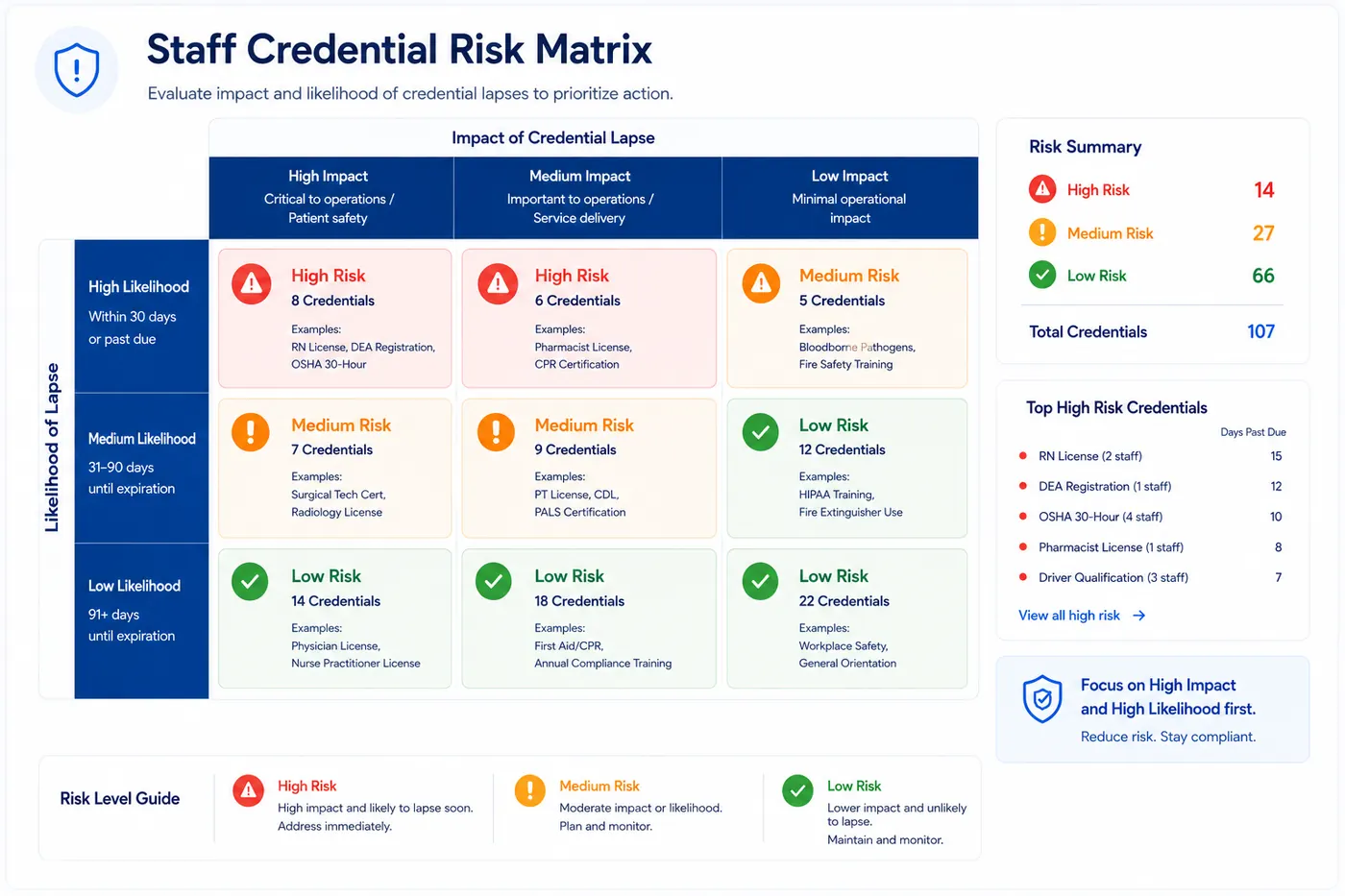
Questions a credential review should answer quickly
The goal of staff credential tracking is not to create more administration. It is to make the weekly review short enough that the team actually does it. A good system should make these questions easy to answer without opening separate files or inbox threads.
A simple weekly staff credential workflow
01
Import or create records
Start with one row per employee credential, not one employee row with many hidden dates.
02
Assign an owner
Make the staff member, manager, or operations lead responsible for renewal follow-up.
03
Set reminder timing
Use longer lead times for credentials that block work, service delivery, or client access.
04
Review the queue weekly
Work expiring, expired, and training-due records before they become operational surprises.
05
Close the cycle
Mark renewed records complete and set the next expiration or review date.
Where staff credential tracking fits inside RenewOps
Staff credential tracking sits between simple certification tracking and heavier enterprise credentialing software. It is most useful when a small team needs to know who is qualified, what expires next, and who owns the renewal work.
Healthcare teams can pair it with healthcare license tracking software. Operations teams can connect it to expiration dashboard queues and email renewal reminders.
FAQ
Staff credential tracking software helps teams monitor employee licenses, certifications, training renewals, owners, expiration dates, reminders, and status in one shared system.
Common records include professional licenses, safety certifications, first aid or CPR, customer-required credentials, role-based training, technical certifications, and recurring compliance training.
Certification tracking focuses on the credential itself. Staff credential tracking connects credentials to employees, departments, owners, role coverage, and weekly review routines.
Critical credentials often need 60 or 90 days of lead time. Standard credentials can use 30, 14, and 7 day reminders, depending on training availability and renewal complexity.
RenewOps is not an enterprise HRIS or full credentialing platform. It is a focused renewal tracking system for small teams that need practical deadline visibility without heavy implementation.
Ownership usually sits with operations, HR, compliance, a team manager, or the person responsible for staffing readiness. The best workflow still assigns each credential to a specific owner.
Yes. Teams can start by importing a CSV with credential names, owners, expiration dates, renewal dates, risk tiers, and notes, then clean up reminders and status inside the system.
Managing clinical credentials too? Continue with healthcare license tracking software .